1. Introduction to the Linux Kernel
2. Process Management
2.1. The process
A process is a program (object code stored on some media) in the midst of execution
-
the executing program code (often called the text section in Unix)
-
set of resources
-
open files
-
pending signals
-
a data section containing global variables
-
Threads of execution, often shortened to threads, are the objects of activity within the process
2.2. Process Descriptor and the Task Structure
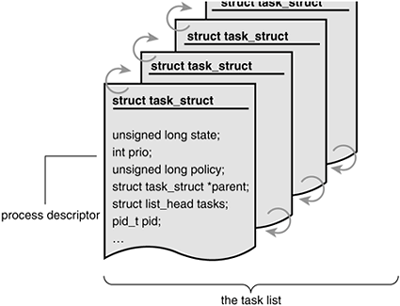
The kernel stores the list of processes in a circular doubly linked list called the task list. 2 Each element in the task list is a process descriptor of the type struct task_struct , which is defined in <linux/sched.h> .The process descriptor contains all the information about a specific process. The task_struct is a relatively large data structure, at around 1.7 kilobytes on a 32-bit machine
2.3. Process State
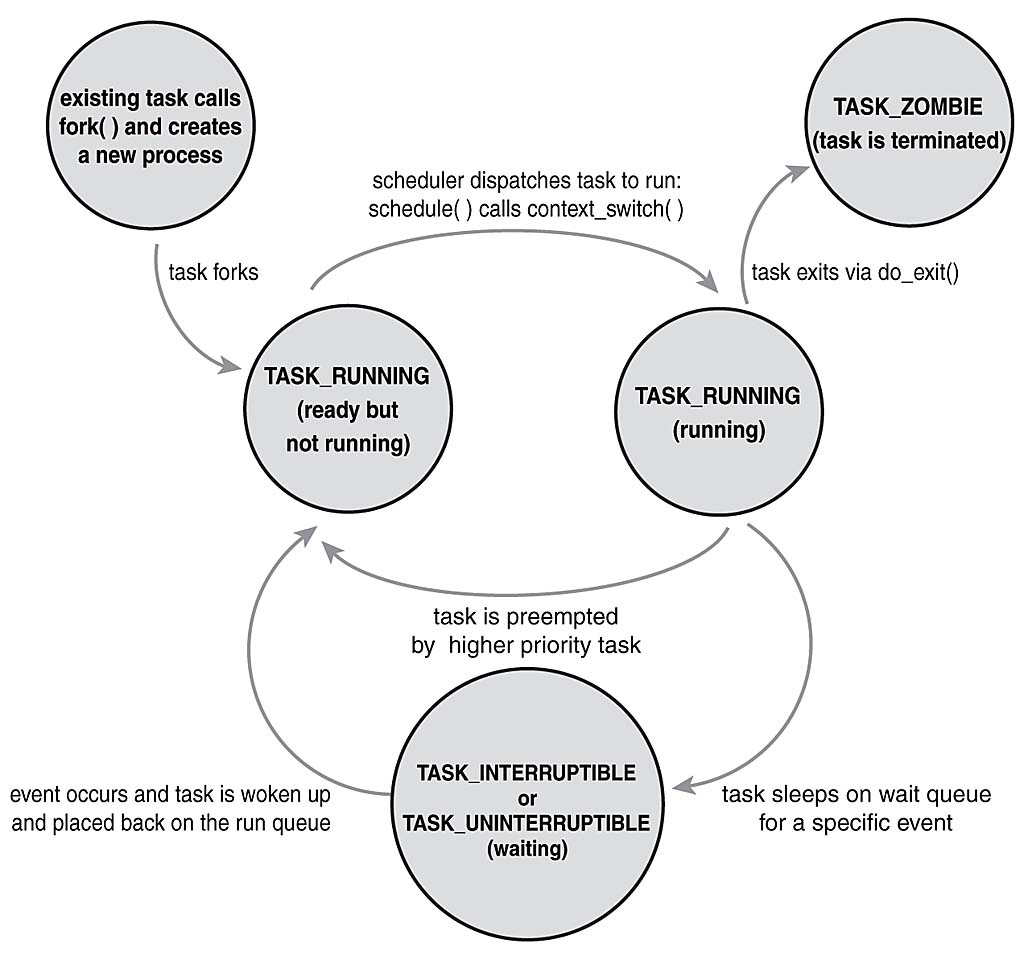
The state field of the process descriptor describes the current condition of the process (see Figure). Each process on the system is in exactly one of five different states.This value is represented by one of five flags
-
TASK_RUNNING: The process is currently running on or a runqueue starting to run
-
TASK_INTERRUPTIBLE: The process is sleeping (that is, it is blocked) waiting for some condition to exist
-
TASK_UNINTERRUPTABLE: This state is identical to TASK_INTERRUPTIBLE except that it does not wake up and become runnable if it receives a signal.This is used in situations where the process must wait without interruption or when the event is expected to occur quite quickly. Because the task does not respond to signals in this state, TASK_UNINTERRUPTIBLE is less often used than TASK_INTERRUPTIBLE . 5
-
__TASK_TRACED: The process is being traced
-
__TASK_STOPPED: Process execution has stopped; the task is not running nor is it eligible to run
3. Process Scheduling
The prior chapter discussed processes, the operating system abstraction of active program chapter discusses the process scheduler, the kernel subsystem that puts those processes to work.
3.1. The process scheduler
The process scheduler decides which process runs, when, and for how long.
3.2. Multitasking
-
A multitasking operating system is one that can simultaneously interleave execution of more than one process
-
On single processor machines, this gives the illusion of multipleprocesses running concurrently
-
On multiprocessor machines, such functionality enables processes to actually run concurrently, in parallel, on different processors
On either type of machine, it also enables many processes to block or sleep, not actually executing until work is available.These processes, although in memory, are not runnable. Instead, such processes utilize the kernel to wait until some event (keyboard input, network data, pas- sage of time, and so on) occurs. Consequently, a modern Linux system can have many processes in memory but, say, only one in a runnable state
-
cooperative multitasking
-
preemptive multitasking
Linux, like all Unix variants and most modern operating systems, implements preemptive multitasking. In preemptive multitasking, the scheduler decides when a process is to cease running and a new process is to begin running
The act of involuntarily suspending a running process is called preemption.The time a process runs before it is preempted is usually predetermined, and it is called the timeslice of the process.
The timeslice, in effect, gives each runnable process a slice of the processor’s time. Manag- ing the timeslice enables the scheduler to make global scheduling decisions for the sys- tem. It also prevents any one process from monopolizing the processor. On many modern operating systems, the timeslice is dynamically calculated as a function of process behavior and configurable system policy
As we shall see, Linux’s unique “fair” scheduler does not employ timeslices per se, to interesting effect.
Conversely, in cooperative multitasking, a process does not stop running until it voluntary decides to do so.The act of a process voluntarily suspending itself is called yielding.
Thankfully, most operating systems designed in the last two decades employ preemptive multitasking, with Mac OS 9 (and earlier) and Windows 3.1 (and earlier) being the most notable (and embarrassing) exceptions.
Of course, Unix has sported preemptive multitasking since its inception.
Since there is really a lot to tell here let’s go to the book of Robert Love on page 41 and beyond
4. Interrupts
-
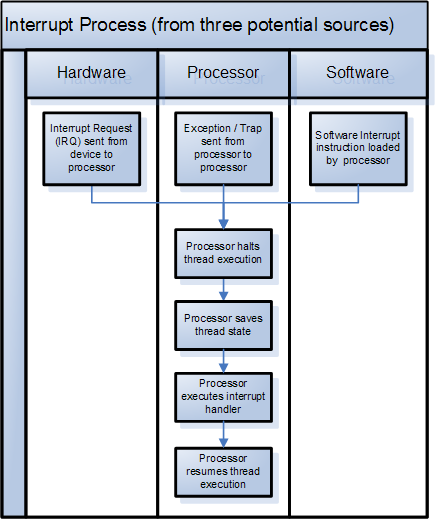
an interrupt is a signal to the processor
-
emitted by hardware or software
-
indicating an event that needs immediate attention
-
-
An interrupt alerts the processor to a high-priority condition requiring the interruption of the current code the processor is executing
-
having a phone call
-
getting a whatsapp
-
something calling your name
-
Is there an interrupt handler executed
-
Did you properly save your state ???
-
suspending its current activities
-
saving its state
-
and … executing a function called an interrupt handler to deal with the event
-
this interruption is temporary, and, after the interrupt handler finishes, the processor resumes normal activities
-
There are two types of interrupts: hardware interrupts and software interrupts
Saying a printer that he is ready with his printing job …
-
System call
-
synchronous
-
-
Exception
-
asynchronous
-
5. System Calls
"Communicating with the Kernel"
-
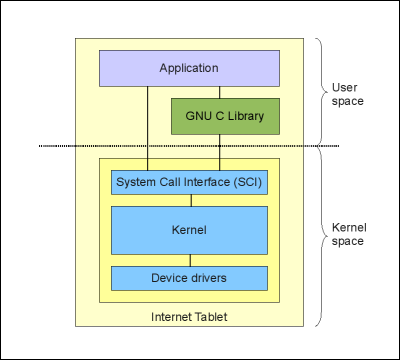
provide a layer between the hardware and user-space processes.
-
This layer serves
-
it provides an abstracted hardware interface for userspace
-
ensure system security and stability.With the kernel acting as a middle- man between system resources and user-space, the kernel can arbitrate access based on permissions, users, and other criteria
-
-
A system call can be used to switch from user mode to kernel mode

5.1. Utilities for System Call Interface
-
strace
-
objdump --source
-
gdb (for later)
5.1.1. Explaining strace
-
strace it
5.1.2. Explaining objdump
-
objdump --source /bin/ls
Exercise objdump
-
To use objdump
-
Login to the angrynerds.carpago.nl host
-
Enter: $ objdump --source /bin/ls
6. Exercise Linux Kernel Hacking
-
Get the .OVA file from the trainer on the stick
-
Extract the zip to a convenient location
-
Startup Virtual Box
-
Disable USB stick
-
Import appliance
-
Start the appliance, if not startable, check USB settings
The 'rloman' user is now the default only sudo user Change his password by the trainer helping you. Create a user for yourself, e.g. for John Doe
$ sudo su
(enter password of rloman which you just changed it to)

# you are root now
$ useradd -m /bin/bash jdoe
$ passwd jdoe
(enter passwd)
$ # login as jdoe now
$ exit
(you are now rloman again)
$ su jdoe
<enter password jdoe)
$ #if that works
$ exit$ sudo visudo
$ #find the line with root in the upper section
$ # add a line for jdoe with the same values below that
$ Exit (Ctrl-X)
$ sudo su
$ (might have to supply pass for jdoe)
$ # you should be root now
$ whoami
$ #root should be printed now6.1. Start the chardev module
$ cd kernel
$ cd investigation-report
$ cd modules
$ cd chardev

$ make clean
$ explore chardev.c
$ cat chardev.c

$ cat Makefile  #watch the content

$ make
$ sudo insmod chardev.ko
$ tail /var/log/syslog #see the messages

$ cat make-module.sh (or something)
$ ./make-module.sh (or something)
The module is now loaded in the Linux Kernel and fully operational
$ cat /dev/chardev #should print some regarding how many times

#when you are done
$ sudo rmmod chardev
7. Credits and Resources
-
From the book of Robert Love, Linux Kernel Development